Federal Contracting Accelerated Steps

Main Resources
Next Lesson
→
Federal Contracting Accelerated Steps
What Are Federal Contracts?
Federal contracts are the high value opportunities of the government world. Federal agencies spend the most money and release the most contracts across websites like SAM.gov, DIBBS, and PIEE. For any aspiring business, success in the federal marketspace can easily become one of their most lucrative revenue streams.
When to Use:
- When your business has enough money, people, and time to work on larger, potentially multi-year, projects.
- When you want to pursue higher paying contracts
Key Features :
- Uniform Bidding Policy: Federal contracts have strict procedures that allow you to navigate most bids with the same repeatable process
- Constant Opportunity: millions of dollars’ worth of contracts is posted daily through key websites like SAM.gov, UNICEF, DIBBS, & PIEE.
- Often contains larger and more comprehensive opportunities.
- More Work = More Money
Limitations :
- A SAM Account/CAGE Code is required before you can apply and be paid for federal contracts.
- Must be Compliant. Research Government CMMC contract compliancy
- Strict rules and regulations: meaning anything in your proposal that does not exactly follow their request, can have your bid disqualified.
Click below to learn more about:
Federal Contracts
→
How Do You Find Federal Contracts
There are many ways to find government contracts depending on what you’re trying to sell and to whom. Most businesses will register with the portal of the federal agency, state, or local government that they wish to work with, then apply for contracts in their industry through that entity’s bidding website or electronic procurement tool. Without a doubt though, the first place any aspiring vendor should go to search for federal contracts is SAM.gov.
SAM.gov
→
What is SAM.gov?
SAM, or the System for Award Management, is the most popular website for businesses that want to sell their goods and services to the US Government. It is a requirement for anyone who wants to work with the federal government to register here before they can be chosen and/or paid for completed work. SAM posts everything from complex cybersecurity programs to simple janitorial contracts. Whether you’re a large business looking for a multi-million-dollar deal or a small business trying to land their first opportunity there is something here for everyone.
Key Features:
Register to do business with the U.S. Government
View past awarded contracts and who won them
Research Primes and top competitors in your industry
Bid on available federal contracts
List bank accounts for invoicing/payment
Network with government agents and departments
Click below to learn more about:
Using SAM.gov
→
Why is SAM Important:
SAM is the largest platform in use today for companies seeking federal jobs and opportunities. Before you can apply for, or even be paid on a federal contract, your business is required to be registered in SAM.gov/help.
Without it your business will be limited to state and local level contracts and won’t have access to the higher value opportunities held by larger federal agencies, even on other federal bidding sites that we will discuss later.
How Do You Navigate SAM.gov?
For now, we’ll assume that you have already optimized your SAM profile and have completed all the steps to be truly Contract Ready. If not, please refer back to our previous training modules and videos.
Searching For Contracts
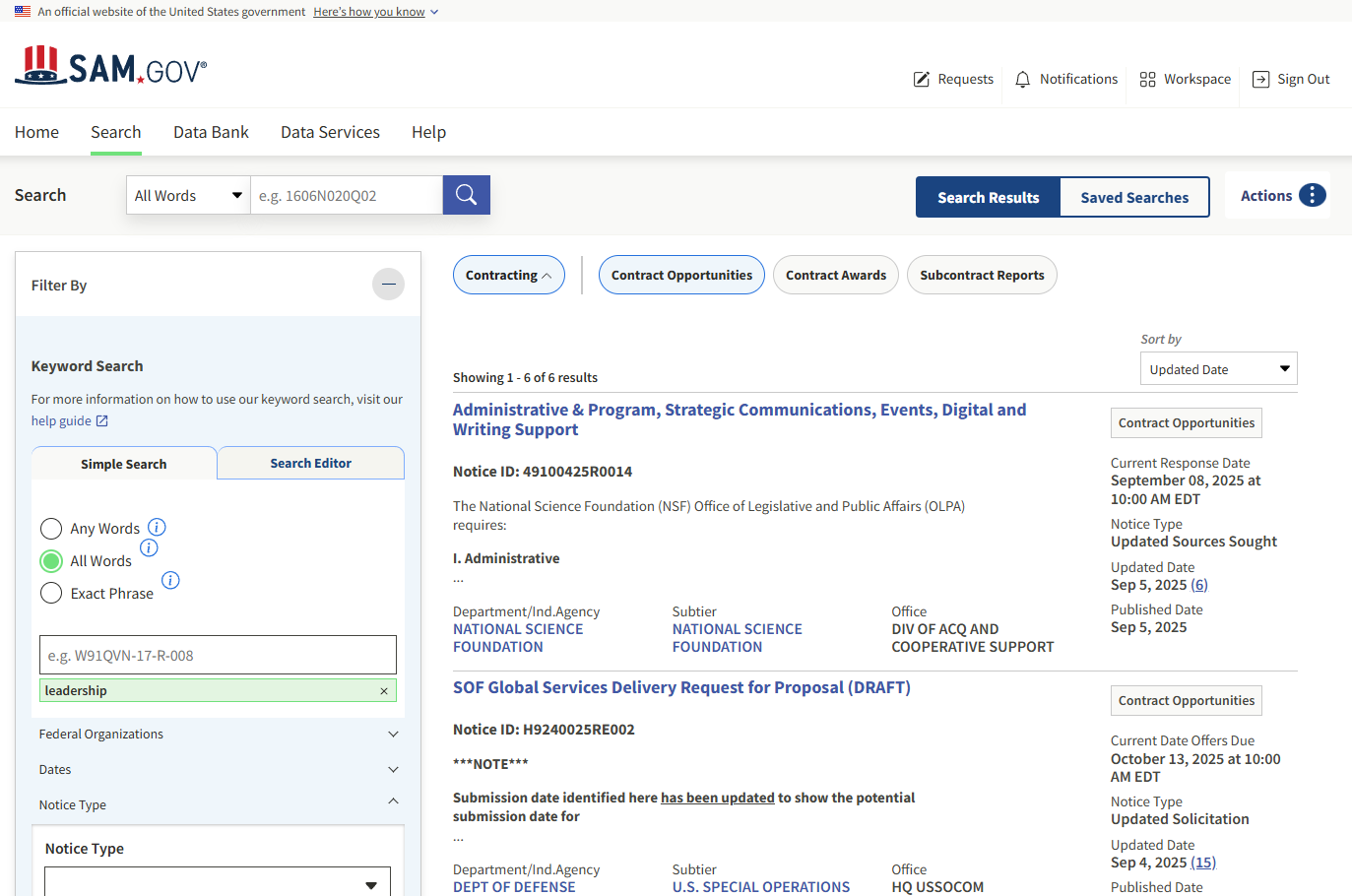
To begin sign in to SAM.gov using your email and password. Then navigate to the Search button in the top left corner. This will allow you to save your searches, so you can easily come back to them in the future and have more than one filter if your business has multiple niche interests that do not overlap.
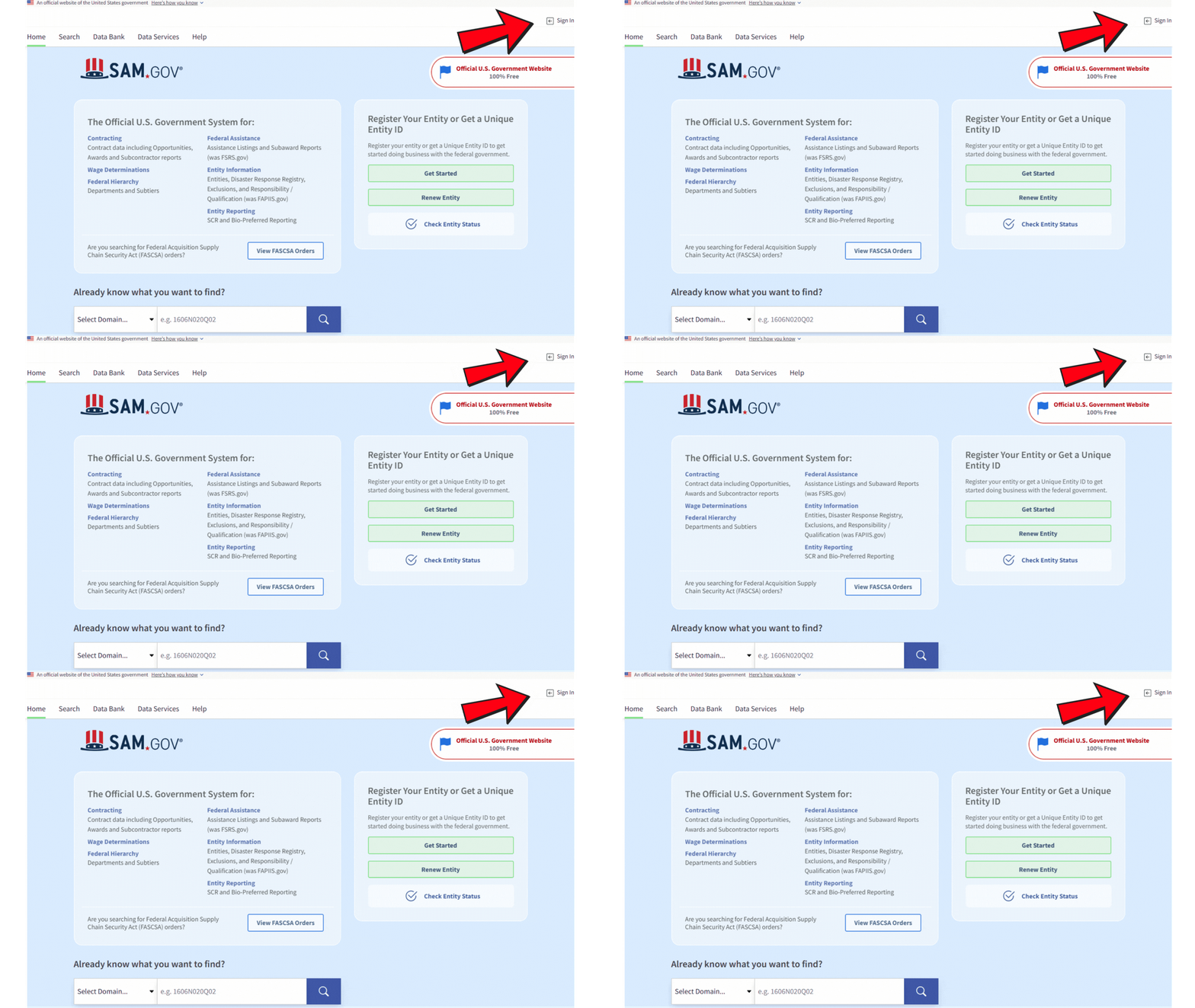
Then navigate to the Search button in the top left corner.
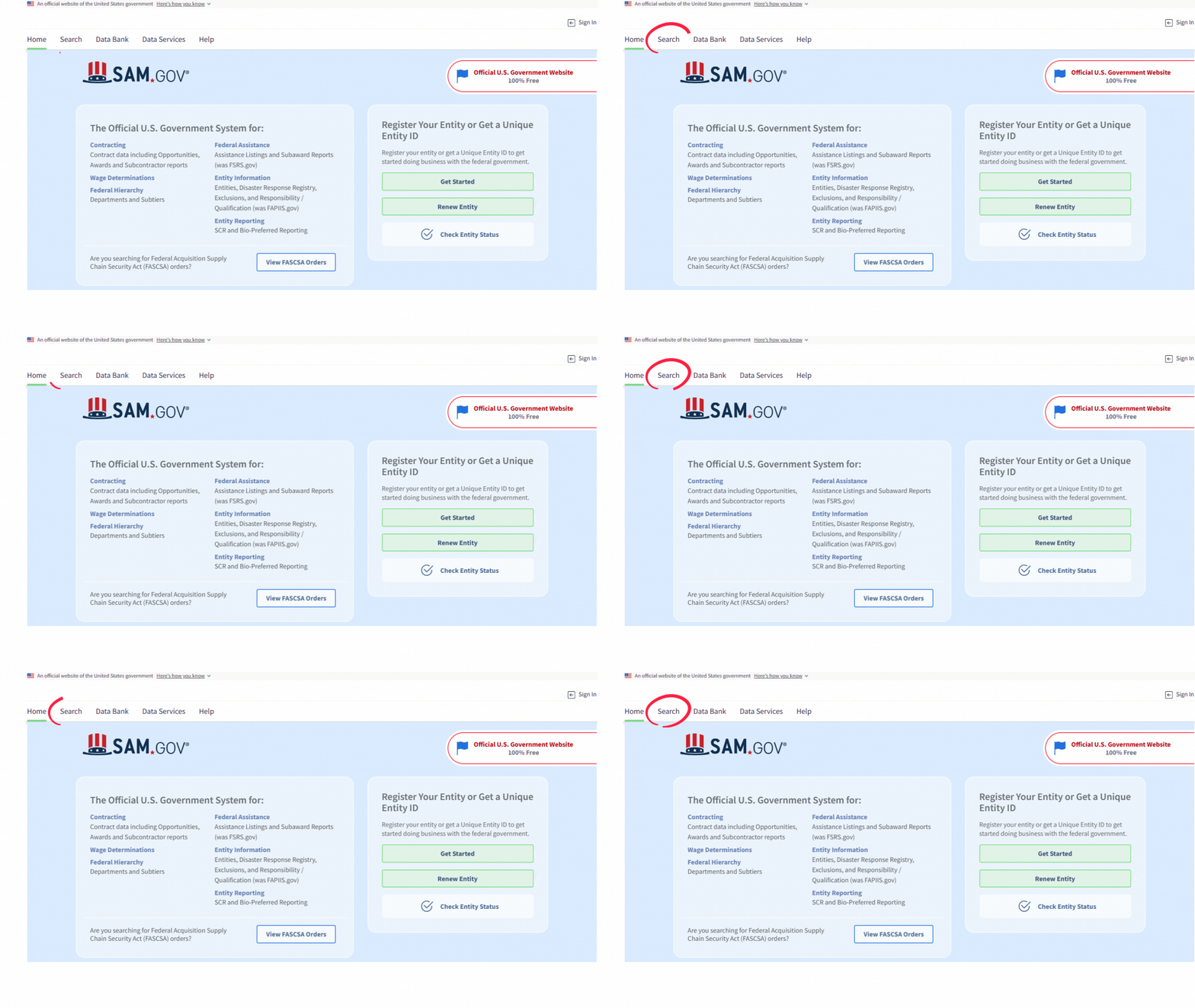
Creating Search Filters
Start by selecting Contracting to help narrow down your search to only ongoing opportunities. Now you’re ready to start setting up your filters.
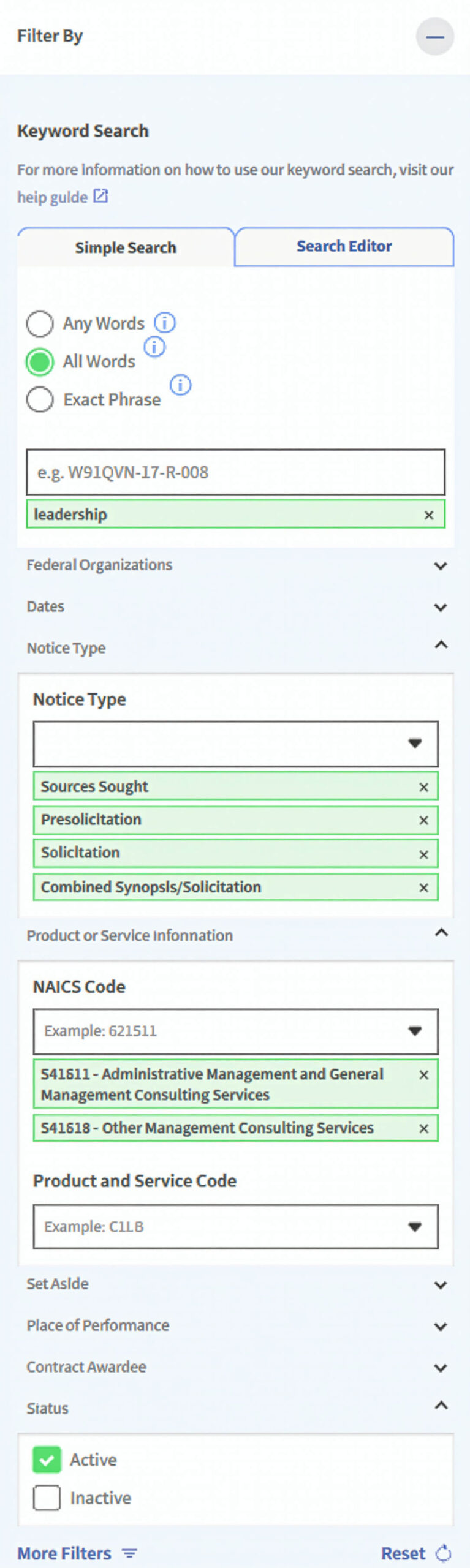
Here are the most important filters to consider:
Keywords:
Commonly used words to describe your industry, product, or service.
- Think of the words that are most likely to appear in a contract’s title or description, ex. Consutrction, automotive, leadership, janitorial, ect.
Notice Type:
This determines the current stage of bidding the contract is in.
- We highly recommend only activating the following when starting out. All other types are either too specific or inaccessible for the majority of the contractors to use.
- Sources Sought
- Presolicitation
- Solicitation
- Combined Synopsis/Solicitation
NAICS Code:
(North American Industry Classification System) A six-digit number that lists every industry for easy classification and identification.
- Ex. 236210 Industrial Building Construction, 561720 Janitorial Service, 541511 Custom Computer Programming Services, 561612 Security Guards and Patrol Services
Set-Aside:
If your business has any Set-Asides list them here.
- WOSB, VOSB, SDVOSB, SBA, Hubzone
Place of Performance:
The location where the work will take place.
- If your company only works in certain areas or states make sure to include them here.
Once you have set your filters and see a number of opportunities that match your capabilities press the ACTIONS button and click SAVE. This will allow you to easily bring the same search up again later without having to recreate each step.
With that step complete you can begin scrolling through the available contracts until you find one that interests you. Click on the Title to begin bidding on the project.
Understanding the Contract Page
Here you’ll be presented with a general overview of the contract opportunity. It is vital that you read through and understand each section before building your proposal to avoid any problems or disqualifications later when the government is evaluating your bid. So be sure to come back to this segment if you’re ever unsure if you’re able to bid on a project, or consult your Select GCR GPA Advisor.
Title:
The name of the contract.
Date Offers Due:
Deadline to submit your proposal.
Department/Ind. Agency:
The Federal Department or Agency that is requesting proposals and is responsible for awarding the contract.
Set-Aside:
Who is qualified to bid on the project. If you do not have the matching Set-Aside you cannot be awarded the contract.
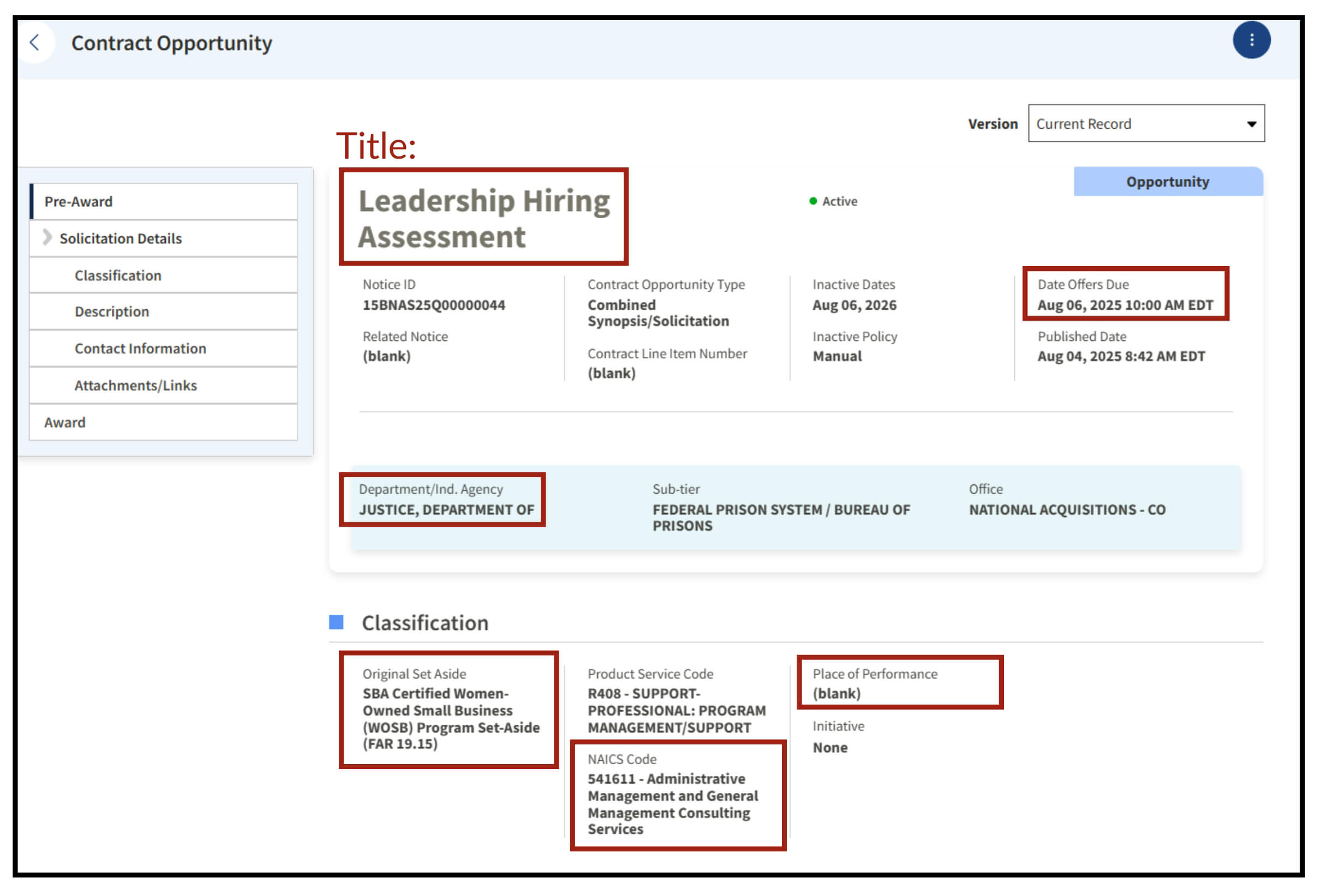
NAICS Code:
The industry this project is classified under.
Place of Performance:
Where the work is being done. (If it says “Blank” then it is likely the work is remote, or the contracting officer simply forgot to list the location.)
Contract Overview
Description & Contact Info
Description:
A brief summary of the job and its requirements. This is entirely up to the discretion of the Contracting officer, and so can vary from a short two word introduction all the way up to a 5 page detailed explanation that lists every item. Either way you’ll need to read through all of it.
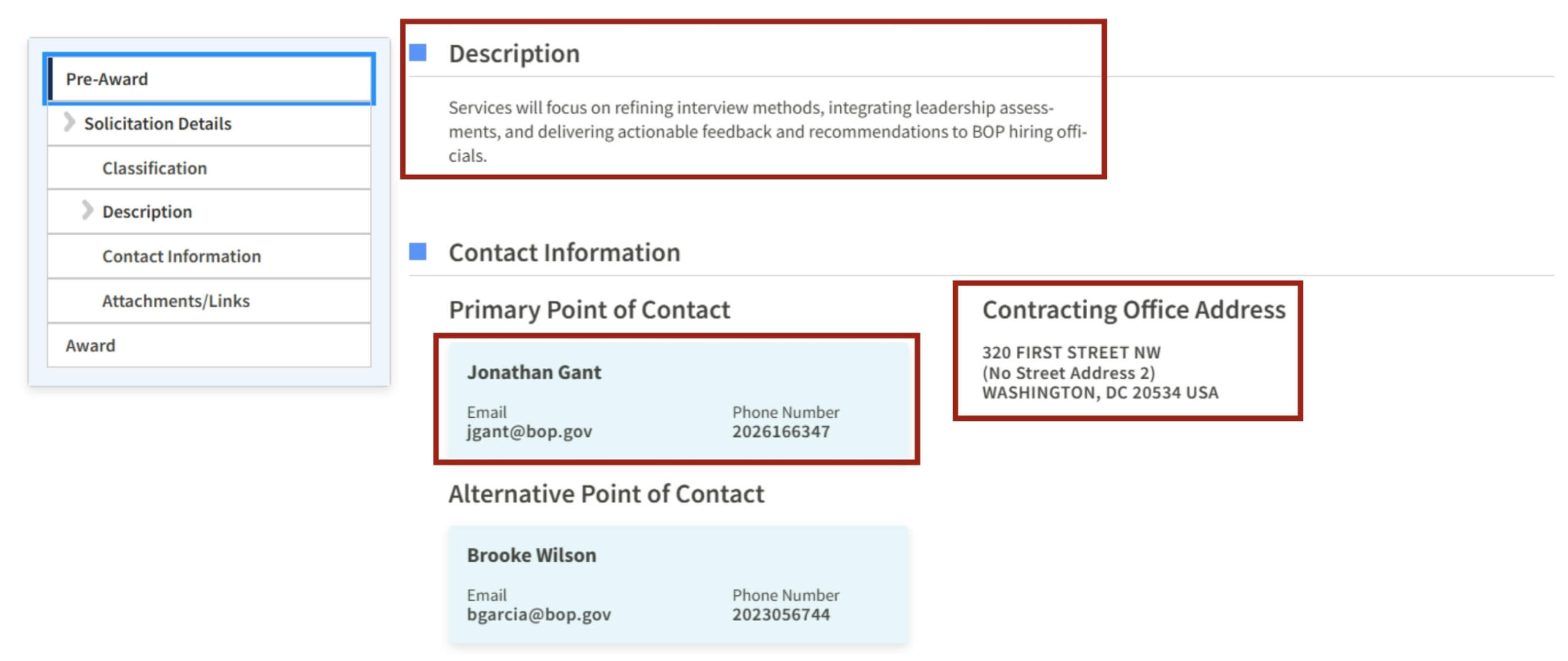
Contact Information:
Who are the contracting officers and main points of contact for this opportunity. They are responsible for answering all of your questions regarding the job and receiving your bid submission via email.
Office Address:
The publishing agency’s location. (This is normally only needed if you have to physically mail in your proposal)
Attachments/Links
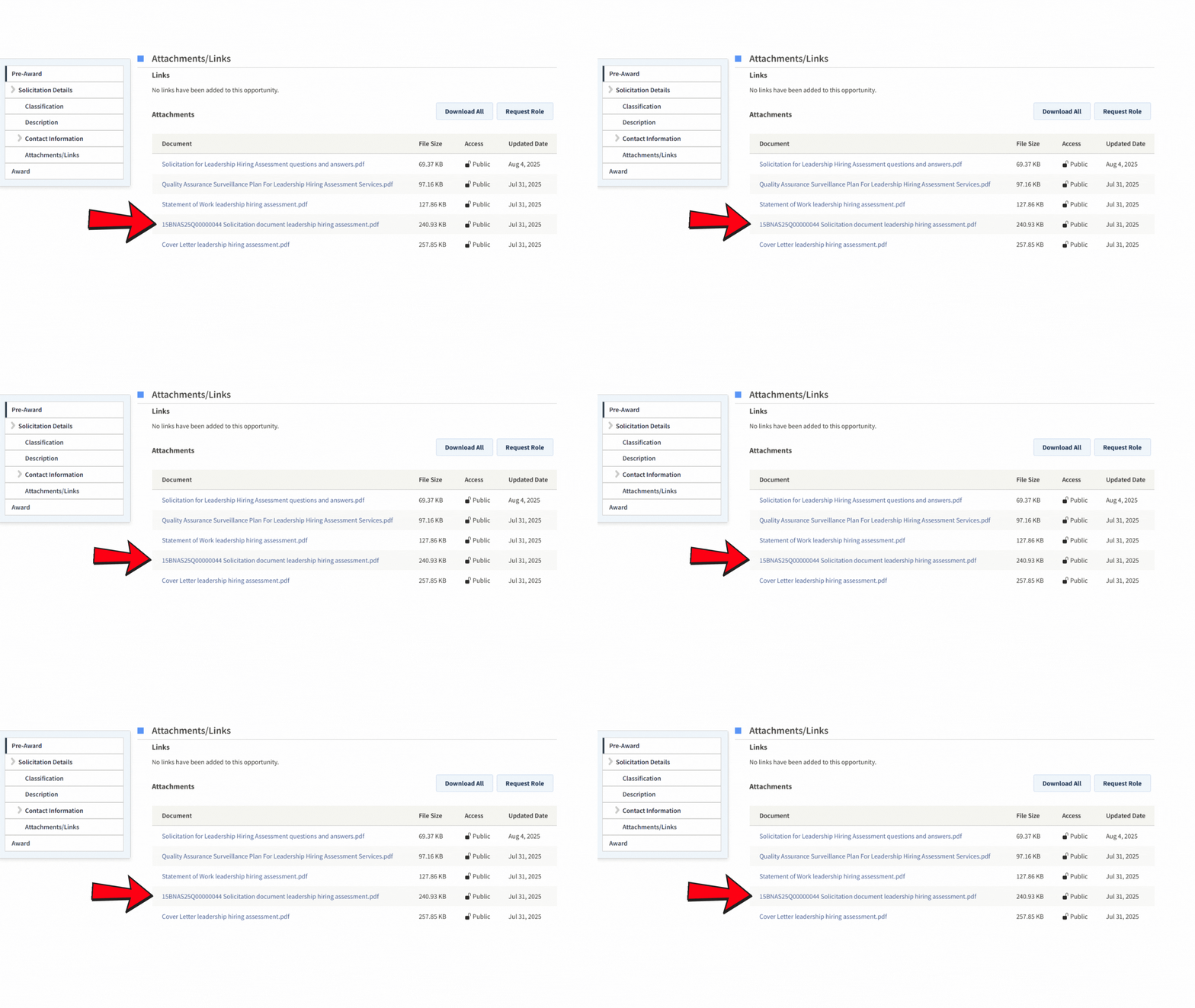
Here is where you can download all of the forms and attachments needed to submit your proposal. It is the single most important section on the bidding page, as it will directly provide you with all the information about the job itself, and the bidding process.
The attachments and links can contain any number of downloads. Sometimes they will break down each section into individual files, and other times the contracting officers will combine all documents into a single pdf. Regardless of which method they choose you will need to read through every single document to understand the full complexities of the job.
These are the most common documents we can expect to find here:
Pricing Sheet:
Normally an excel sheet or pdf where you will determine how much you’re going to charge the government to do the work they’re requesting.
Statement of Work:
This is the first document you should look for and read through. Often titled as SOW, it is a complete and detailed description of all of the duties, responsibilities, and requirements of the job (i.e. what will you actually be doing)
Primary Bidding Document:
Contains all the formatting and rules regarding how to submit the proposal. This is often the most important document to look for, as it will contain the majority of the forms you will be filling out.
- It is most often labeled with RFQ, RFP, RFI, Sol, solicitation, or very simply the Solicitation ID by itself.
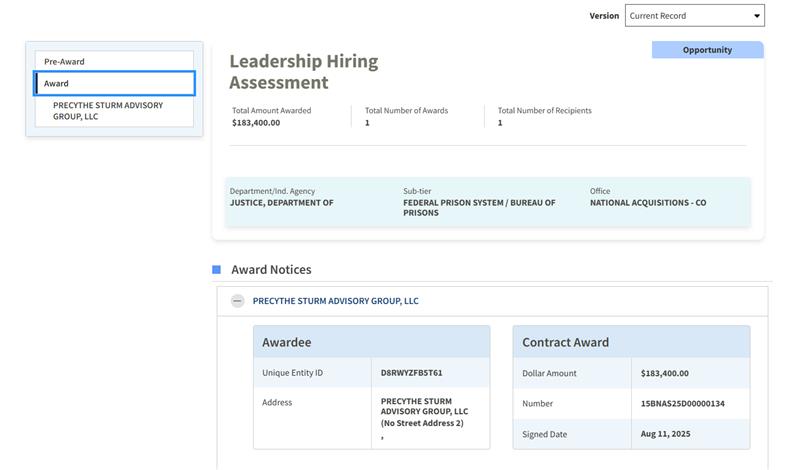
Award Information
Once the government is finished with evaluating all the proposals they received and their decision for who to award the contract to is made they are required to make a public notice regarding who won and how much they awarded for it. If your company was not selected for award, and still wishes to work on this project it is recommend that you reach out to the company listed in the Awardee section and introduce yourself as a potential subcontractor.
Click below if you need a refresher:
How to Effectively Build Relationships With Primes
→
What Are the Other Federal Bidding Sites?
What can you do if you search through SAM.gov, and still can’t find any opportunities that match your business’ scope and capabilities. Luckily for us there is more than one site when it comes to securing federal opportunities.
The next most popular federal bidding sites are as follows:
PIEE (Procurement Integrated Enterprise Environment)
The Procurement Integrated Enterprise Environment is the main source of spending for the Department of Defense (DoD) and their associated agencies. The goal of PIEE is to host and streamline federal contracts and opportunities for the DoD. Making it easier for the military, and other agencies, to quickly and efficiently purchase goods and services.
PIEE’s Full Training Guide
→
DIBBS - DLA Internet Bid Board System
The DLA Internet Bid Board System (DIBBS) is the Defense Logistics Agency’s (DLA) website for streamlined product purchases. For machine shops, manufacturers, or anyone who sells products that the government regularly needs (electronics, medical devices, groceries, food items, and more) this is the site to use thanks to its simplified quoting system and constant demand for new items.
DIBBS Pocket Guide
→
Select GCR Pro
Select GCR Pro is a powerful, proprietary database that pulls available contract and contact information from thousands of local, state, and national Government websites and databases into one unique and easy to use platform. It was designed by our team with our clients in mind to help them easily source contract opportunities no matter their location or industry.
SGCRP Platform Guide
→
How Do You Research Existing and Expired Federal Contracts and Spending
There are a number of beneficial government websites that are designed to provide the public with information and data concerning all previously awarded federal contracts. By using these websites aspiring vendors can research past spending trends to determine what a competitive price on their own bid will be. As well as view the award history of agencies and private businesses within their industry.
The two most used websites to view contract history are FPDS and USAspending, which we will cover more in depth below:
Beneficial Government Websites
→
What is FPDS.GOV?
The Federal Procurement Data System (FPDS) is the single source for US government-wide procurement data. FPDS is the current central repository of information on Federal contracting and provides detailed information on all contract actions. The Executive departments and agencies award over $800 billion annually for goods and services. The system can identify who bought what, from whom, for how much, when, and where.
FPDS Users can view the following:
- Contracting Officers
- Contract Start and End Dates
- Type and Method of Contract
- Place of Performance
- Legislative Mandates (ex. Construction Wage Rate Requirements, Clinger-Cohen Act, Labor Standards)
- All Post Award Modifications to the contract
- A Description of the Contract or Contract Modification
- If the Contract was subject to full or open competition
- Number of Offers/Bids Received
FPDS’ V 1.5 User Manual
→
Why is FPDS Important?
For any company that wants to research their competition and see a precise review of every contract awarded, including sole source, FPDS is the way to go. It will provide an abundance of information that allows for deep dives into a company or agency’s procurement history. This is especially important if you are submitting a bid and know who your most likely competitors will be. By using FPDS we can create a comprehensive analysis of key factors such as:
Do they have an existing relationship with the federal agency in charge of the bid?
Are they winning contracts in open competition or through vehicles like Sole Source and the GSA?
Are the prices of their contracts above or below industry standards?
Do their contracts have a history of going over or under budget?
However, there are a few drawbacks. Mainly due to FPDS’ outdated design and less than user friendly UI. For news users, it can take quite a bit of time reading guides or playing around before they feel comfortable using it.
What is USAspending.gov?
USAspending is a government source for data on federal awards by state, congressional district (CD), county, and zip code. The awards data in USAspending.gov are provided by federal agencies and represent contracts, grants, loans, and other forms of financial assistance.
Data that is currently included in USAspending:
Information on an agency’s total spending, including contract awards
Recipient Award Date
Location, industry, subcontractors, Set-Aside Status, and more
Ready made analyses on various topics
Understanding Agency Spending
Insights into Federal Award Recipients
Overview of Federal Awards Made to States
Data that is not currently included in USAspending:
Personally identifiable information (PII)
Information that may compromise national security
Proprietary information or documents from federal award recipients
Tax expenditure data, including Economic Impact Payments (i.e., COVID stimulus checks)
Getting Started with USAspending.gov
→
How to Find Government Contracts for Small Businesses
→
Why is USASpending Important?
USAspending serves a very similar role to FPDS, but has an updated interface that makes it far easier to use no matter if you’re just starting out or a seasoned contract specialist. It also includes easy to access information on Subcontractors, and helpful tools for analyzing past spending trends for multiple subjects such as Agency, Location, Set-Aside Status, and more. All of this combines to make USAspending the go to tool for anyone that wants to be able to swiftly and efficiently sort through and understand how the federal government engages with and spends money in their industry.